Thursday, 25 August 2022
Reading Practice Intensive - Session One
Sunday, 3 July 2022
Digital Fluency Intensive - Session Ten: External Recognition
As all good things must do, our journey through DFI has come to an end.
It has been an awesome experience, learning, creating, and sharing with our fellow teachers, just like our students do, and really drives home the importance of continuing to develop our own learning programs to reflect the changing world around us.
It can be so easy to fall back on traditional methodology, and pedagogy, however the course has challenged us to reflect on those things, and to ask ourselves "How are we, as teachers, readying our students for learning in a digital world?" "How can we create adaptable, and resilient learners?" "How can we teach our students to navigate the vast digital world around them in intelligent ways?"
Over the last 10 weeks we have covered a multitude of different ideas, and learning areas, from basic elements like how to use Docs, Sheets, and Drawings, to more advanced coding mechanics, computational thinking, multimodal, and multi-textual learning experiences. All of these things work together to create a community of learners and teachers who are well-rounded, self-driven, and motivated to learn more, because they know the best ways to do it.
It is easy for us as teachers to reflect on what we already do, and fit our current teaching into these frameworks, and say "DONE!", but if we are truly going to prepare ourselves, and our students for the technological changes that happen in the future, we must be ready to reevaluate what it means to learn, create, and share in this new digital landscape, and adjust our practices accordingly.
We are no longer the gatekeepers on knowledge, as our teachers were, where what the said was the gospel truth, and only later in life did we unlearn some of the misinterpretations, or misunderstandings they may have had... looking at you, I before E except after C...; instead our job as teachers is more of a pastoral role, a shepherd, who guides and helps navigate their students through the masses of information they now have at their fingertips, to differentiate the reliable, the credible, and the usefulness of their experiences. Who gives them the awareness to understand how they present themselves online, and create an image of themselves in the digital world.
We no longer talk about "safe" we talk about "smart", empowering our students instead of frightening them. By giving them ownership, and agency over what they learn, create, and share online we help them to develop good practices that allow them to thrive in the digital space, and to share their experiences with others, so that they might do the same.
I want to thank our facilitators; Dorothy, Matt, Naomi, and Vicki who have shown great patience, and wisdom in helping us over the last 10 weeks, I can't wait to put everything you've taught us into practice, one step at a time.
Thursday, 30 June 2022
Digital Fluency Intensive - Session Eight: Computational Thinking & Empowerment
Empowered
Creating empowerment is such an important concept to put into practice - people in our communities have felt like they don’t necessarily have the power to influence, and the ability to affect change, and so giving them that power is critical to building communities that control their own success and outcomes (rangatiratanga).
Power gives you choice - many of our families do not have choices in what happens to them. By providing quality education and opportunities we can give these families the opportunities to get/create jobs which can provide them with an income to give them choices. Choices are powerful.
The Number 3 - Our new-entrance students are performing at the age of 3; not just academically, but socially, medically, and psychologically. Students at high decile schools hear 32 million more words than student’s in low-decile schools. The development of language is so critical for learning, and has to be modelled to our students, because they may not be getting it at home.
Equity; How can we give access to effective teaching, digital equipment and infrastructure to help them overcome difficulties which they have no power over to disadvantaged students?
Computational Thinking
We began the discussion with a game based on block coding where we had to guide a
“robot” through a maze using explicit instructions. This is the foundational learning level
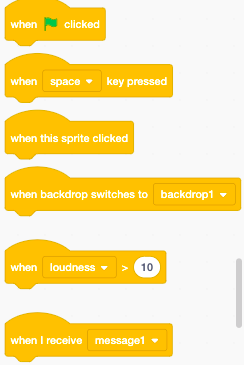
for our students, and in school we have been working with Scratch - a program which allows
students to create their own animations and games where sprites are given instructions to follow.
Being Digitally Fluent in a LCS World
The Manaiakalani Programme aims to…
Support teachers to acquire digital fluency
Have teachers learn how digital tech can accelerate achievement
Support teachers to be confident delivering curriculum in a digital context
Thinking about how we practically apply these skills is critical - this is not just theoretical learning,
there has to be a tangible outcome for our students based on the learning we have done in DFI.
Curriculum Connections
Computational Thinking for Digital Technologies
Students develop an understanding of comp sci principles; learning programming so they can become creators
Designing and Developing Digital Outcomes
Students learn how to design fit-for-purpose digital solutions
Practice
| Knowledge
| Nature of Tech
|
Starting with teaching students the language necessary for students to comprehend the ideas and concepts they will be learning is critical.
Coding
In our last two sessions we explored different coding tools online - in particular Scratch, which is a program our students at PES are quite familiar with. They have been working on constructing their own Scratch game in their Creative Space time, focused on exploring, and discovering more about our school, and offering visitors the opportunity to learn more about our school.
The tutorials on Scratch are incredibly helpful, and give the students loads of useful tips and tricks for using the different blocks to control, and animate different “sprites'', the objects that can be interacted with, as well as creating their own backgrounds (or they can use their own). The tutorials are pretty critical for the learning process as they provide context to what otherwise might be pretty vague instructions for them to follow.
Scratch is a wonderful tool because it allows students to cover the absolute basics of computational thinking, and instruction giving, but it also allows students who are more confident with it to really push the boundaries, and create immersive, and super interactive games and concepts.
Thursday, 16 June 2022
Digital Fluency Intensive - Session Seven: Devices
Ubiquitous
I was not really familiar with this word before engaging with Manaiakalani pedagogy; it means to be present, and found everywhere. It relates to how we connect to our learners, and our communities. It became particularly pertinent to our success when we went into lock down in 2021 and our hybrid learning models during 2022; we should be able to offer our students learning experiences whenever, and wherever and they are, even if we aren’t in the classroom. Removing the barriers of time and place.
We also work to embrace the rewindable learning model which can allow students to control the pace at which they work through their learning; giving students the opportunity to pause, rewind, fast forward through their learning is a valuable tool, and works to give students more ownership of their own learning.
Ubiquitous learning opportunities are increasingly valuable for our students; they do not have the same exposure to language, and literacy as other students, so the more opportunities we give them, through things like the Summer Learning Journey, we see great improvements, and maintenance of the learning they have done.
Cybersmart
Empowering our learners as connected and confident decisions makers in the online space. We talk about Smart, not Safe. The internet should not be seen as a scary place, so by focusing on the positive we empower students to make good decisions when they’re online.
“The new digital citizenship takes students beyond the protective, to the proactive” (Team ISTE, 2017)
By helping students to understand how to learn, create and share in the digital world, in a smart way, we empower them to navigate, share, learn, and create, within it, with confidence. In a digital age it is really important that they understand the permanent nature of the internet, for example, understanding that the things they do online have longevity etc.
Manaiakalani One:One
Through the lens of Partnership, Participation & Protection (Waitangi framework).
Today we focus on…
Partnership element;
- Ako is a whanau or community experience
- Engagement in the decision making process eg. Kawa of Care
- Engagement through device ownership
- Every learner can participate
- Every teacher can be supported to become Digitally Fluent when all devices are the same
- Equity; all students feel part of the collective by using the same devices
Protection element;
This should all happen behind the scenes
Partnership with Hapara to design Teacher Dashboard to make all digital learning visible
Partnership with N4L and Linewize for filtering the internet so that students don’t need to worry too much about the safety elements of their internet browsing.
Student Devices
Today we worked on the devices our students used, and familiarised ourselves with how to operate the devices. This is incredibly important because a lot of our students may not be fluent with them, and if we don’t know how to use them expertly we are hindering our students ability to explore, and navigate their devices on their own, post-teaching. If we are fluent with these devices we give our students the best opportunities to Learn, Create and Share to their full capability.
We explored both Chromebooks and iPads; I’ve become very familiar with chromebooks as they have been a part of my teaching journey since the beginning, however the iPad activity I found very useful; the se of the Explain Everything app has a wide range of possibilities; it's a great way of recording the interactive processes used in maths for example. This has encouraged me to think of new ways I could use this, particularly when working with maths groups, as we can work on the whiteboard, but also record our process in order to create rewindable learning experiences for our students;
Present problem -> Open EE -> Record whiteboard -> Problem solve w/ students -> Share video with students & post on class site/in slides.
This also applies to Screencastify/Quicktime screen recordings. These are incredibly useful tools for talking our students through instructional sequences and to provide rewindable learning for our students which is guided.
Screencastify has an awesome feature, which is that it allows you to insert questions into the video. These are interactive, and can help me to understand better, which areas of the instructions may have been difficult for them, or ones which they already have a good grasp on. These forms of formative feedback will be invaluable, as they do not require a lot of effort from students, they will engage with them because they are interactive, and the data is collected for me to refer back to, in order to better guide my practice.
Here is a small example of how this works;
Thursday, 9 June 2022
Digital Fluency Intensive - Session Six
Enabling Access - Sites
Connectivity
Connectivity is one of the most critically important parts of being part of Manaiakalani; the sharing element of the pedagogy is only valuable when it generates, and creates interactions between the audience and the creator.
This kind of connectivity gives the students a great sense of empowerment that they are doing important work, and give them the ability to connect and engage with others around the country and world; I think this could be a great tool to break students out of a “local and personal” mentality, and get them to think , and learn about the wider world around them. This is critically important as students advance through schooling, and fits in nicely with the SOLO taxonomy idea of relationality, and the extended abstract (generating curiosity and making connections about the world around them)
Tuhi Mai Tuhi Atu
was a wonderful experience; making connections between our class, and other classes around the country to create a little community of sharing, and engaging with students from around the country, while also empowering students to be Cybersmart through the leaving of quality blog comments and engaging in online behaviour that elevates thinking, and positive actions.
Teaching Community
Creating a community of learning is also a really valuable tool for teachers, as we strengthen our practices by collaborating, and sharing the ideas which have worked well in our respective school communities allows us to create a robust learning curriculum for our students.
Manaiakalani Pedagogy focuses on building the Learn - Create - Share model by building towards the end goal of combining all of these elements, by taking clear steps to understand how each element works.
Thursday, 2 June 2022
Digital Fluency Intensive - Session Five
Visible Learning
Creating visible learning is a critical part of the Manaiakalani pedagogy; creating transparency between us as teachers, the students, whanau, and the community in order to develop strong partnerships between the school, and learners.
Teaching is a more collaborative process than ever before, and we should be making an effort to include as many relevant parties as we can in the process; by including people we can share the responsibility for learning - a problem shared is a problem halved, so to speak.
"It is our job to get inside the learner's mind. Not the learner's job to get inside ours”
Creating learning opportunities that are effective across our learners lives means we make learning accessible, available, and in advance. Nothing happens by surprise, students are aware of learning intentions, outcomes, and of the tasks they will be working on.
Feeds strongly into the feedback/feedforward elements through the use of comments & sharing on Google, and blogging our work (both students and teachers)
Multimodal Learning
- Priority Goals
- Engagement
- Personalised Learning
- Accelerated achievement
- Empowerment
Creating engagement is critical to learning, and so the more personalised, and relevant information is a powerful tool; it is also critical for student’s information literacy, understanding how many different types of texts, and styles of presenting information. By empowering our students with information literacy through a variety of text types, and multimodal learning we give them confidence not only to tackle the work they do in class, but also to become life-long learners who are confident navigating the contemporary world of information.
Our class sites are the first port-of-call for creating an engaging place for our student’s learning; in order to do this we need to be creating multi-modal designs for them to engage with.
We design these sites with the following in mind;
- Engagement
- Accessibility
- Empowerment and agency (making choices about their learning)
- Cognitive complex
- Personalisation, and differentiation
- Universal Design for Learning (UDL)
Multimodal Designs used for behavioural engagement & Multi-textural design for cognitive engagement
For me to focus on;
Finding ways to separate tasks into smaller chunks
Offer greater variety of texts, not just variation of activity options
Multi-textual Learning
Along the lines of T-Shaped literacy, multi-textual learning is built around the idea that we don’t teach to text; we teach to theme or a structured set of ideas. By using a variety of texts from multiple perspectives/contexts we give students a wider array of information from which to draw conclusions;
Main text (w/ identified theme)- the focal point of the teaching, and the one which we use as the fundamental gatekey to the learning.
Complementary texts - texts which are similar in idea, theme and/or reading level to support information.
Scaffolded text - a text which is chosen for the purpose of supporting students who are finding reading the main/complementary texts difficult.
Challenging text - texts which will challenge pre-existing ideas, ideas within the text, or perhaps cognitively challenging by being more in-depth, or a more difficult reading level (which can also require some support and scaffolding for students to read)
Learner selected text- gives students ownership over their learning, and also allows them to exercise their own research skills, and choose texts which are interesting and relevant to their own interests.
“Identifying what is an appropriately challenging text is a very complex undertaking as it is not just determined by quantifiable features such as lexiles, but by multifarious factors including students’ prior knowledge and interest in the topics at hand, their motivation to read, the extent to which the task is purposeful (and they see it as purposeful). We believe that one affordance of text sets, as opposed to single texts, is that the range of texts used increases the likelihood that all students will find at least one text that is challenging and all students will find at least one text that is accessible. Text sets might therefore be seen to spread the risk that one text would be too easy or too hard. Achieving the balance between high and deep, wide and narrow is likewise a very fine balancing act, and what is the appropriate balance is always contingent on the students’ strengths and needs and the purpose and context.” (Wilson and Jesson, 2019)
Google Sites
I've been very familiar with Google Sites over the last 4 years working at PES, but understanding the process of creating one which is multimodal and multi-textual has been an awesome challenge - here is one I created today as an example of what can be accomplished using Google Sites; following the Manaiakalani pedagogy of Learn, Create, Share the site is simple; three learning areas, with a variety of texts, tasks and activities for the students to complete, and to share their learning with their classmates, and the wider community
Thursday, 26 May 2022
Digital Fluency Intensive - Session 4
Session Four - Dealing with Data
Sharing
“Every person on the planet has the potential to live life as the star of their own movie - not only sharing the daily minutiae, but also the commentary, the analysis of it and creating collections of feedback and feed-forward.”- DJ Burt
Human beings have an instinct to share; how can we channel that instinct into genuine learning experiences?
Allowing students to share their learning creates a community of engagement, and gives students a sense of pride seeing how other people engage with the work they have been doing - it also encourages students to create work which is thorough, properly finished, and writing descriptions for their blog also gives them time to reflect and summarise their learning experiences.
Giving students the opportunity to have an authentic audience (i.e edublog) will help them to raise achievement outcomes, and for students to develop a real sense of pride in the work that they have created, and the learning they’ve done. An authentic audience, as defined under Manaiakalani, are the people who CHOOSE to listen to you.
Sharing with;
- One another
- The class
- The school
- The local community
- Global communities (digital age)
Blogging was the choice for students to share their learning for different reasons;
It resembles the spaces our young people want to be on (youtube, facebook, etc.)
We are able to provide legal, safe, secure provisions for students
Used by teachers and students
Allows for engagement, and interaction between creator and audience (going back to authentic audiences)
Spaces like Facebook, while useful, are open, and not safe for students to share personal information.
Allows for students to create a SMART digital footprint.
We share to show the process, but also to help students understand what “finished” looks like; that it is ready to share. A life-long lesson to learn, we use the acronym FIOP at Pt England for our learning; to finish it off properly.
Google Forms
Google Forms is something I am very familiar with, we used it frequently in my time as a high school teacher;
Quizzes for students, and allows for easy collection of date - transferable to Sheets so collation of data is helpful
Feedback about what they found difficult, challenging or needed help with.
Use for interaction with families - to gather information, find helpers, get feedback etc.
Useful for gathering information quickly, and is more engaging than just responding to an email when getting into contact with adults who can be busy.
Google Sheets
Google Sheets is very similar, and has a lot of the same functionality as Microsoft Excel which is helpful as I can use a lot of my prior learning/knowledge to help.
This is a very powerful tool when organising, filtering data, particularly when creating groups based on reading age for example, or to arrange students into priority groups based on test results, or feedback from a Google Form.
In a digital age it is so important that we allow tools, like Sheets, to assist us to use critically important data to guide our teaching practices; whether that's for organisational purposes, for streaming students, or to identifying outliers who may need further assistance, or pushing depending on where they fall on the spectrum of results.
Here is an example of data that has been turned into a table; comparing two student's blog posts between 2015 and 2021. As you can see the Y Axis does not show accurately the number of posts, however it is useful for making comparisons between two different elements of data.
A Brand New Voyage!
I start, and finish every year off with such a great sense of excitement; Christmas, New Years, and long, merry days in the sun wondering ...
-
Today's session focused on the element of the "Learn Create Share" model that I am most excited about to take on in my journe...
-
Visible Learning Creating visible learning is a critical part of the Manaiakalani pedagogy; creating transparency between us as teachers, th...
-
Ubiquitous I was not really familiar with this word before engaging with Manaiakalani pedagogy; it means to be present, and found everywhere...